
Headless Ghost: Building a Static Front End Without Losing the Admin
Ghost 3.0 made headless publishing practical: keep the admin and APIs, ship a static Gatsby or Next.js front end. Here is how the architecture works and what to watch for.
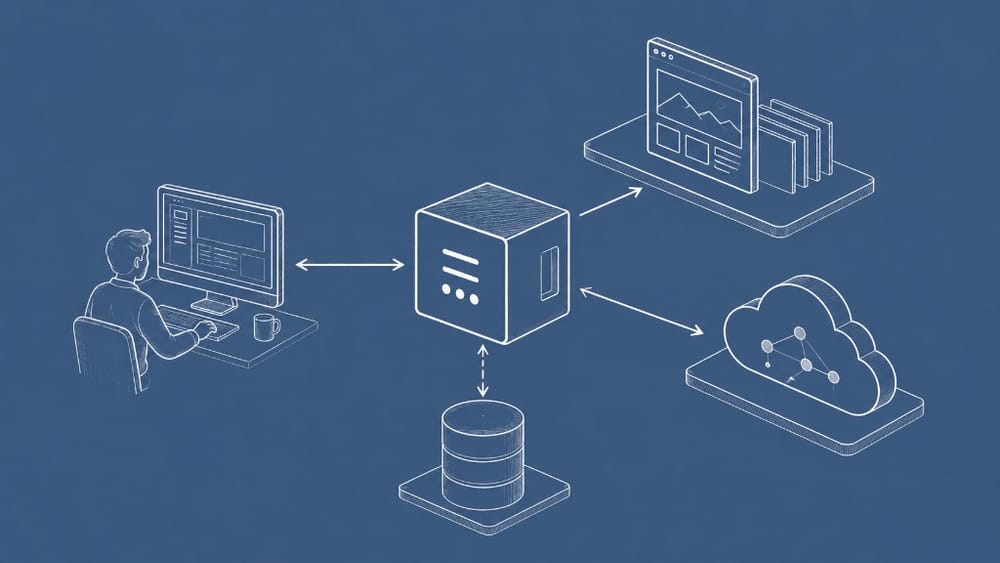
Ghost 3.0 made headless publishing a first-class story—not a hack. Teams could ship a static or JAMstack front end while editors kept the Ghost admin they already knew. The Content API served posts, tags, and settings as JSON. The Admin API handled automation. Ghost.org itself moved to this pattern, proving the architecture at production scale.
What “headless Ghost” actually means
Headless does not mean “no theme.” It means decoupling presentation from content storage.
In a traditional Ghost install, Handlebars themes render HTML on the server. In a headless setup, Ghost still stores posts, manages members, and sends newsletters—but a separate app (Gatsby, Next.js, Astro, Hugo) fetches content via API and builds pages.
The admin stays put. Writers do not learn a new CMS. Developers gain freedom to choose frameworks, deploy to CDNs, and optimize front-end performance independently.
Why teams choose this architecture
Performance at the edge
Static site generators pre-render pages at build time. The result ships to a CDN as plain HTML and assets—fast globally, cheap to host, resilient under traffic spikes. For marketing sites, docs portals, or publication homepages, that profile beats server-rendered themes on a single Node instance.
Front-end independence
Your design team may want React component libraries, incremental static regeneration, or edge middleware that Ghost themes were never meant to host. Headless lets you adopt those tools without forking Ghost core.
Same editorial workflow
Editors still draft in Ghost, schedule posts, and manage tags. API keys gate read access. Webhooks trigger rebuilds when content publishes. The publishing ritual stays familiar even when the public site looks nothing like Casper.
The moving parts
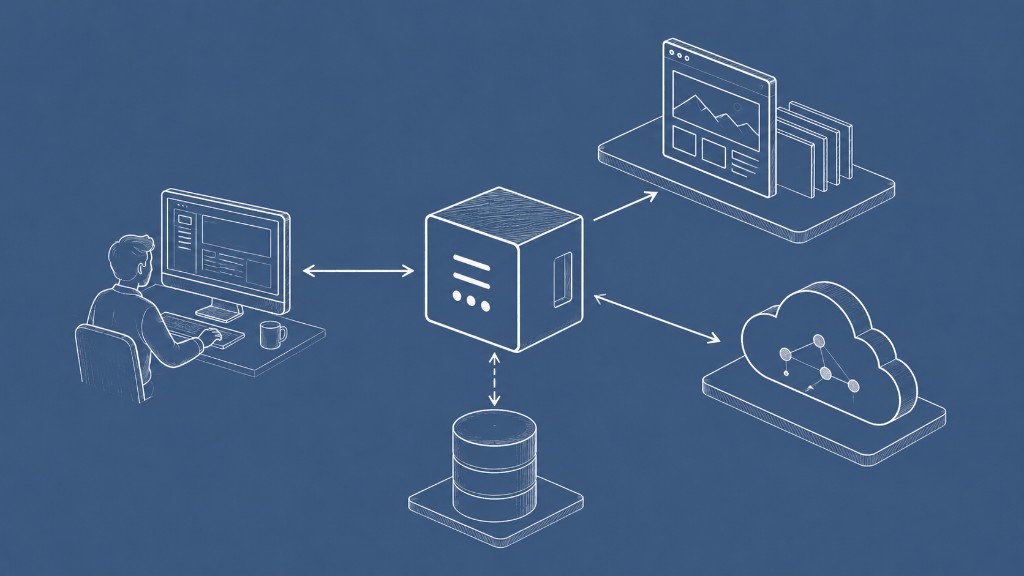
A typical headless Ghost stack includes:
- Ghost instance — self-hosted or Ghost(Pro), running the admin and APIs
- Content API key — read-only access for published content
- Static site generator — Gatsby with
gatsby-source-ghost, Next.js with fetch at build time, or similar - Build pipeline — CI job that runs on webhook or cron when posts change
- CDN host — Netlify, Vercel, Cloudflare Pages, or S3 + CloudFront
The illustration is simple: Ghost sits at the center; your static front end, database, and deploy pipeline orbit it.
What you keep—and what you give up
You keep: Ghost editor, member records, newsletter tooling (on supported setups), webhooks, and structured content APIs.
You give up or rebuild: Default Portal flows may need custom integration on external front ends. Theme helpers like {{ghost_head}} do not apply—you implement SEO, Open Graph, and analytics in your framework. Some membership UI must be wired manually if readers subscribe outside Ghost’s bundled theme.
For many teams that trade is intentional. They want Ghost as content infrastructure, not as the entire public site renderer.
Getting started without over-engineering
Start small:
- Run Ghost locally or on staging with a Content API key
- Scaffold a Gatsby or Next.js site that lists posts and renders a single post template
- Add a webhook in Ghost Admin → Integrations that hits your CI build URL on
post.published - Deploy the static output to your CDN
Once the loop works—publish in Ghost, rebuild, see the live page—you can expand to tag pages, author archives, and custom routes.
Do not headless everything on day one. Many publications run Ghost themes for the blog and a static microsite for marketing. Hybrid setups are valid.
Common pitfalls
- Forgetting rebuild triggers — content updates silently until the next deploy unless webhooks or ISR handle it
- Hardcoding API URLs — use environment variables for Ghost URL and keys across dev/staging/production
- Ignoring member visibility — filter paid content in your SSG logic; the Content API exposes visibility fields for a reason
- Skipping image optimization — Ghost serves images, but your front end should still lazy-load and size appropriately
How this fits Ghost’s roadmap
Ghost 3.0 formalized the API-first direction that started in earlier releases. Later versions added Portal, richer membership flows, and Lexical editing—but the headless pattern remained supported. If you are evaluating Ghost today, you are not choosing between “blog” and “headless.” You can run both, sequentially or in parallel.
For membership and API context from the same era, see the Ghost 3.0 release guide.


Discussion